
For admins
Book for a member or guest
Create a booking on behalf of a member or a walk-in guest, and collect payment.
Admins can book a court for someone else — a registered member or a non-registered guest — straight from the Schedule. This is the only place a guest can be added to a booking; members book for themselves from the Book tab.
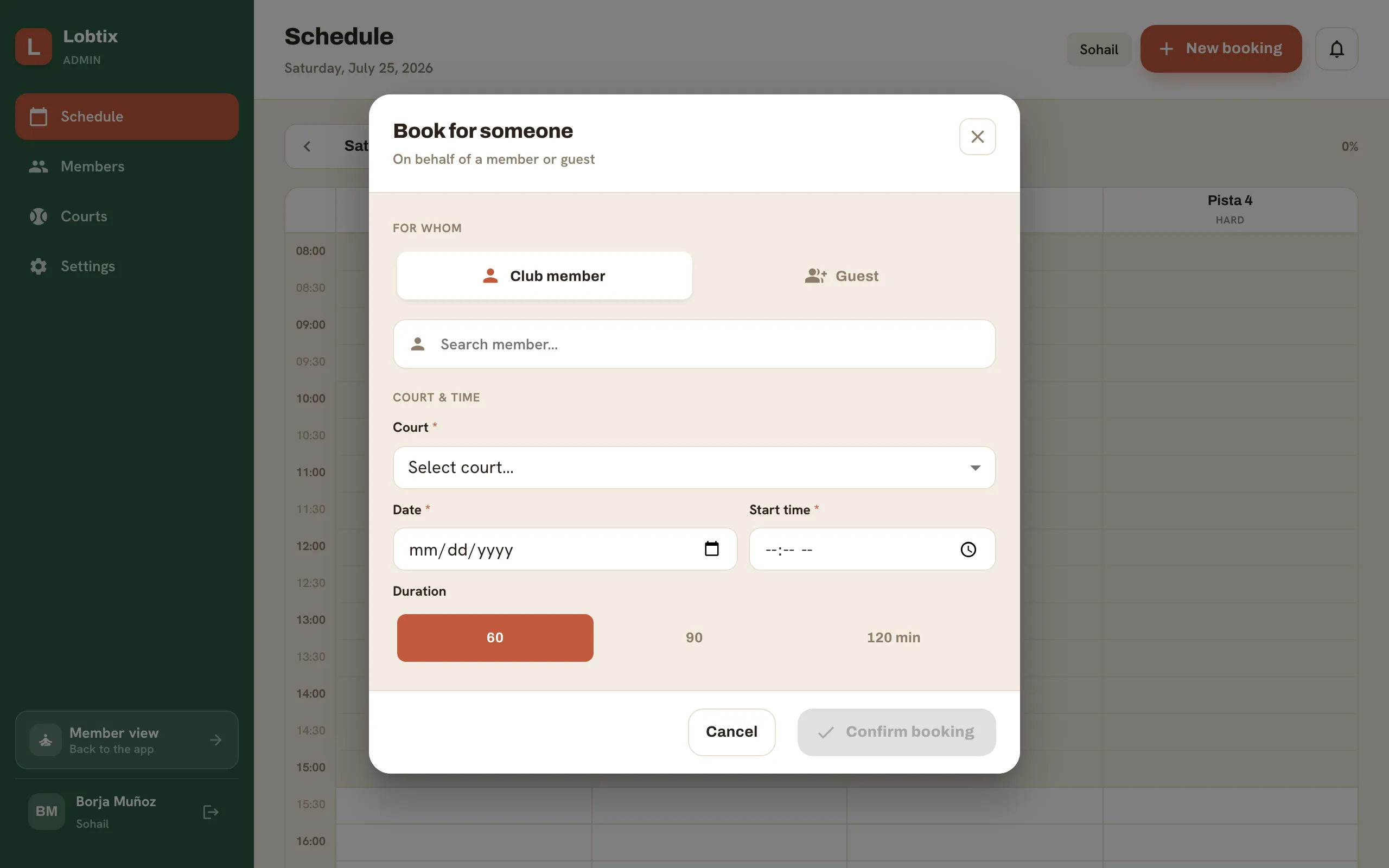
- Go to Admin → Schedule. Tap New booking, or tap an empty future slot on the grid to prefill the court and time.
- Choose Club member or Guest.
- For a member, search and pick them — their club-credit balance is shown.
- For a guest, enter a name (phone and notes are optional).
- Confirm the court, date, start time and duration.
- Handle payment (see below), then create the booking.
Payment
Section titled “Payment”How payment works depends on who you’re booking for:
- Member with enough credit — the court cost comes off their club credit immediately and the booking is settled.
- Member without enough credit, or a guest (guests have no credit) — choose Leave unpaid to collect later, or Mark collected to record that they’ve already paid.
Unpaid bookings show an amber Unpaid pill on the Schedule and in the booking’s detail popover, and are listed under Billing → Outstanding. When the money comes in, open the booking (or the Outstanding row) and tap Mark as paid.
Still need a hand?
Can't find what you're looking for? Our team is happy to help.